Securing Edge Functions
Authentication patterns for Edge Functions
The withSupabase wrapper from @supabase/server verifies the caller's credentials against a declared auth mode and hands you a pre-configured Supabase client on ctx. The sections below show how to use it for each common auth scenario.
For how authorization headers and the verify_jwt platform check work under the hood, see Authorization headers.
| Mode | Accepts |
|---|---|
'user' | A valid user JWT on Authorization |
'secret' | A secret key on apikey |
'publishable' | A publishable key on apikey |
'none' | Any caller, no check (for signed webhooks) |
Authenticated user calls#
Functions called by signed-in users — typically through supabase.functions.invoke from the client — send the user's session JWT on the Authorization header. Keep verify_jwt = true (the default) so the platform validates the JWT before your handler runs, then use auth: 'user' to get ctx.supabase already scoped to the caller's RLS policies.
import { withSupabase } from 'npm:@supabase/server'export default { fetch: withSupabase({ auth: 'user' }, async (_req, ctx) => { const { supabase, supabaseAdmin, userClaims, jwtClaims, authMode } = ctx // supabase — RLS-scoped to the authenticated user // supabaseAdmin — bypasses RLS (service role) // userClaims — user identity from JWT (id, email, role) // jwtClaims — full JWT claims // authMode — which auth mode matched // your business logic goes here return Response.json({ email: ctx.userClaims?.email }) }),}Service-to-service calls#
Cron jobs, workers, pg_net, or another Edge Function make calls with a secret key on the apikey header rather than a user JWT. Disable verify_jwt and use auth: 'secret' to validate the key against any secret key from your dashboard. You get ctx.supabaseAdmin for privileged work.
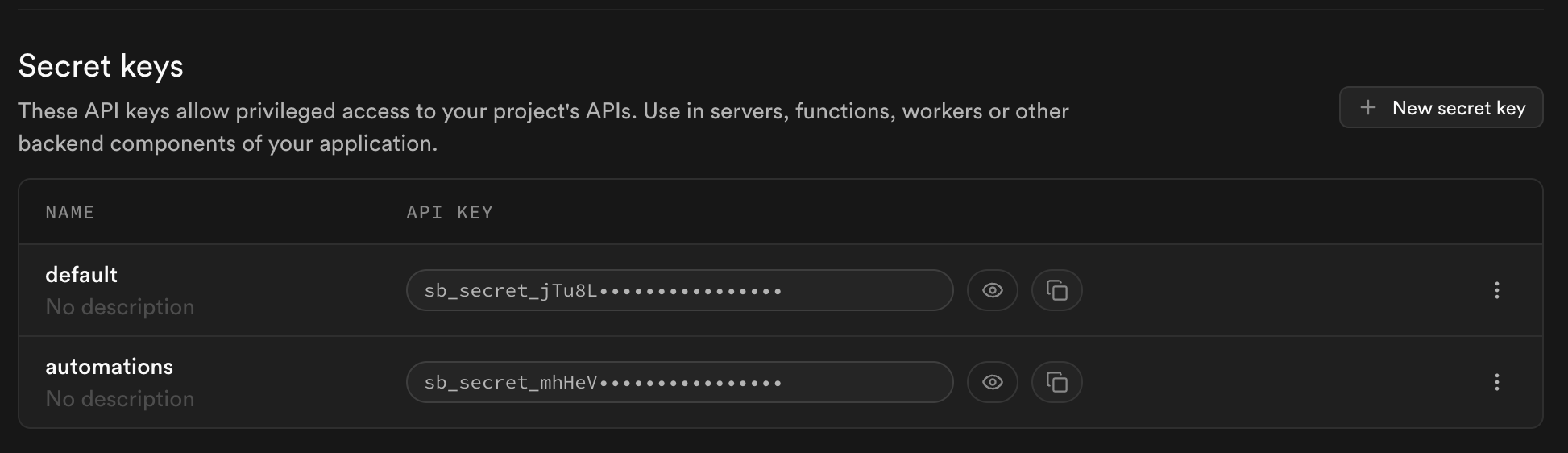
import { withSupabase } from 'npm:@supabase/server'export default { fetch: withSupabase({ auth: 'secret' }, async (_req, ctx) => { // your business logic. ctx.supabaseAdmin bypasses RLS return Response.json({ ok: true }) }),}To accept only one specific key, use auth: 'secret:<name>'. For example, auth: 'secret:automations' only accepts the secret key you named "automations" in the Settings > API keys section of the Dashboard. The same syntax works for publishable keys (auth: 'publishable:<name>').
Public functions#
For a genuinely public function, like a health check, use auth: 'none' with verify_jwt = false so anonymous callers can reach the handler.
[functions.health]verify_jwt = falseimport { withSupabase } from 'npm:@supabase/server'export default { fetch: withSupabase({ auth: 'none' }, async () => { // your business logic return Response.json({ ok: true }) }),}auth: 'none' skips every credential check — see the caution under External webhooks before using it on anything that reads or writes sensitive data.
External webhooks#
External providers like Stripe or GitHub don't send Supabase credentials. They sign the request body with their own shared secret. Use auth: 'none' to skip the SDK's credential check, then verify the provider's signature inside the handler. Keep verify_jwt = false.
import { withSupabase } from 'npm:@supabase/server'import Stripe from 'npm:stripe'const stripe = new Stripe(Deno.env.get('STRIPE_SECRET_KEY')!)// Deno has no synchronous Node crypto, so signature verification must go through// Stripe's SubtleCryptoProvider. The synchronous `constructEvent()` throws// "SubtleCryptoProvider cannot be used in a synchronous context" on this runtime.const cryptoProvider = Stripe.createSubtleCryptoProvider()export default { fetch: withSupabase({ auth: 'none' }, async (req, ctx) => { const signature = req.headers.get('stripe-signature') ?? '' const body = await req.text() try { await stripe.webhooks.constructEventAsync( body, signature, Deno.env.get('STRIPE_WEBHOOK_SECRET')!, undefined, cryptoProvider ) } catch (err) { // Log the reason so a configuration error isn't mistaken for a forged payload. console.error('Stripe signature verification failed:', err) return new Response('bad signature', { status: 400 }) } // your business logic. ctx.supabaseAdmin available for db work return Response.json({ received: true }) }),}auth: 'none' disables every credential check. Your handler is fully responsible for authenticating the caller. Never use it on an endpoint that reads or writes sensitive data without verifying the caller some other way.
Combining modes#
Functions that answer both users and internal callers take an array on auth. Modes are tried in order. The first match wins, and ctx.authMode tells you which matched.
import { withSupabase } from 'npm:@supabase/server'export default { fetch: withSupabase({ auth: ['user', 'secret'] }, async (req, ctx) => { if (ctx.authMode === 'user') { // your business logic for user calls. ctx.supabase is scoped to them return Response.json({ ok: true }) } // your business logic for service calls. ctx.supabaseAdmin bypasses RLS return Response.json({ ok: true }) }),}Custom error responses#
To shape the 401 response yourself, use createSupabaseContext instead of withSupabase. It returns a { data, error } tuple so you stay in control.
import { createSupabaseContext } from 'npm:@supabase/server'export default { fetch: async (req: Request) => { const { data: ctx, error } = await createSupabaseContext(req, { auth: 'user' }) if (error) { return Response.json({ message: error.message, code: error.code }, { status: error.status }) } return Response.json({ message: `hello ${ctx.userClaims?.email}` }) },}Environment variables#
@supabase/server reads its configuration from a standard set of environment variables. On the Supabase platform and in local development with the CLI, these are auto-provisioned.
| Variable | What it is |
|---|---|
SUPABASE_URL | Your project URL |
SUPABASE_PUBLISHABLE_KEYS | Named publishable keys as a JSON object |
SUPABASE_SECRET_KEYS | Named secret keys as a JSON object |
SUPABASE_JWKS | JSON Web Key Set used to verify user JWTs |
Local development with the CLI uses a single-key setup, which the SDK also accepts as a fallback: SUPABASE_PUBLISHABLE_KEY and SUPABASE_SECRET_KEY.
The same zero-config experience is available on other runtimes. Install @supabase/server in your Node.js, Bun, Cloudflare Workers, or self-hosted Deno app and set the environment variables above. See the package's environment variables guide for the full reference.