Connect to your database
Supabase provides several ways to connect to your Postgres database, whether your code runs in the frontend, in a persistent backend, or in a serverless function.
Learn how to pick a connection method and where to find the connection string for it.
- Which connection method do you use? picks a method based on where your code runs.
- Get your connection string shows where each string comes from.
- Configure your client sets pool size, prepared statements, and SSL.
- Quickstarts connect a specific ORM or database GUI.
For how pooling works and the limits that apply to your connections, see Connection pooling and limits.
Which connection method do you use? #
How you connect to your database depends on where your code runs. Find your case in the table, then get the matching connection string.
| Where your code runs | Use | Why |
|---|---|---|
| A frontend application | Data API | Works over REST or GraphQL, so you don't need a Postgres client. Requires Row Level Security. |
| A serverless or edge function | Shared pooler, transaction mode | These environments open many short-lived connections. |
| A persistent backend on IPv6, or with the IPv4 add-on | Direct connection | No pooler in the path. |
| A persistent backend on an IPv4-only network | Shared pooler, session mode | The shared pooler is IPv4-only on every plan. |
| A third-party tool, such as a BI client or database GUI | Shared pooler, session mode | Reachable over IPv4 from networks you don't control, and it supports prepared statements. |
| A high-performance application on a paid plan | Dedicated pooler | Runs on the same machine as your database, so lower latency than the shared pooler. |
Migrations, pg_dump, backup and restore, or replication | Direct connection | These are single sessions and Postgres native commands. |
The IPv4 add-on is not dual-stack: enabling it swaps the project's IPv6 (AAAA) DNS record for an IPv4 (A) record, so the project endpoint becomes reachable only over IPv4.
For the host, port, and IP version of each mode, see Endpoints and IP versions. For a named ORM or database GUI, see Quickstarts.
Get your connection string #
Connecting from a frontend application? You don't need a connection string. Skip to Data APIs and client libraries, which uses your project URL and an API key instead.
For every Postgres connection mode, the string comes from the same place:
- Open your project in the Supabase Dashboard.
- Click Connect at the top of the page.
- Choose the connection method you picked above.
- Copy the string and replace
[YOUR-PASSWORD]with your database password. Percent-encode any reserved characters it contains, such as&,#,?, or a space.
The sections below show what each string looks like and when to use it. Take the host, port, and username from the string you copied rather than typing the bracketed placeholders literally. The pooler host in particular can't be composed from your region, and pooled connections use a different username from direct connections. Both are covered under Endpoints and IP versions.
Direct connection #
The direct connection string connects directly to your Postgres instance. Use it for persistent backends, such as virtual machines (VMs) and long-running containers. Examples include AWS EC2 machines, Fly.io VMs, and DigitalOcean Droplets.
Direct connections are on IPv6, or on IPv4 if the project has the IPv4 add-on. If your network is IPv4-only and you don't have the add-on, use session mode instead.
postgresql://postgres:[YOUR-PASSWORD]@db.[PROJECT-REF].supabase.co:5432/postgresGet this string from the Supabase Dashboard by clicking Connect.
Shared pooler, session mode #
The session mode connection string connects to your Postgres instance through the shared pooler. Use it as an alternative to a direct connection when you connect from an IPv4-only network.
postgresql://postgres.[PROJECT-REF]:[YOUR-PASSWORD]@[POOLER-HOST]:5432/postgresGet this string from the Supabase Dashboard by clicking Connect and choosing Session pooler.
Shared pooler, transaction mode #
The transaction mode connection string connects to your Postgres instance through the shared pooler in transaction-pooling mode. Use it for serverless and edge functions, which open many short-lived connections.
Transaction mode does not support prepared statements. To avoid errors, turn them off in your connection library. See Transaction mode limitations for the setting your driver uses and for the other session-state features this affects.
postgresql://postgres.[PROJECT-REF]:[YOUR-PASSWORD]@[POOLER-HOST]:6543/postgresGet this string from the Supabase Dashboard by clicking Connect and choosing Transaction pooler.
Dedicated pooler #
On paid plans, Supabase provisions a dedicated pooler that runs alongside your Postgres database. The dedicated pooler runs in transaction mode only. For session mode, use the shared pooler. It is reachable over IPv6, or over IPv4 if the project has the IPv4 add-on.
postgresql://postgres:[YOUR-PASSWORD]@db.[PROJECT-REF].supabase.co:6543/postgresGet this string from the Supabase Dashboard by clicking Connect.
Data APIs and client libraries #
The Data APIs let you interact with your database using REST or GraphQL requests. You can use these APIs to fetch and insert data from the frontend, as long as your tables have Row Level Security (RLS) enabled and policies that allow the access. RLS with no policies denies every request.
For convenience, you can also use the Supabase client libraries, which wrap the Data APIs with a developer-friendly interface and handle authentication for you:
Endpoints and IP versions #
Each mode has its own host, port, and IP version support. IP version support depends on your plan and on whether the project has the IPv4 add-on.
| Mode | Host:Port | Free | Paid | Paid + IPv4 add-on |
|---|---|---|---|---|
| Direct connection | db.[PROJECT-REF].supabase.co:5432 | IPv6 | IPv6 | IPv4 |
| Shared pooler, session mode | aws-[INDEX]-[REGION].pooler.supabase.com:5432 | IPv4 | IPv4 | IPv4 |
| Shared pooler, transaction mode | aws-[INDEX]-[REGION].pooler.supabase.com:6543 | IPv4 | IPv4 | IPv4 |
| Dedicated pooler, transaction mode | db.[PROJECT-REF].supabase.co:6543 | - | IPv6 | IPv4 |
[INDEX] in the shared pooler host is a pooler cluster index, not part of the region name. A region can have more than one, so you can't work out your host from your region. Copy the host from the Connect dialog.
The username differs by connection type. Direct connections and the dedicated pooler use postgres. Shared pooler connections use postgres.[PROJECT-REF]. If you connect as a custom role through the shared pooler, the username is [ROLE].[PROJECT-REF].
The port routes the connection to the right pooler and mode. Port 5432 reaches Postgres for a direct connection and Supavisor for session mode. Port 6543 reaches PgBouncer for the dedicated pooler and Supavisor for shared transaction mode.
To connect over IPv4, you have two options. The shared pooler is IPv4-only on every plan, in both session and transaction mode. Alternatively, add the IPv4 add-on to your project, which makes the direct connection and the dedicated pooler reachable over IPv4 instead of IPv6.
Configure your client#
A connection string on its own isn't enough. Your connection library keeps its own pool of connections, separate from the poolers Supabase runs, and its defaults assume a persistent backend.
In a serverless function:
- Create the client once at module scope, not per request.
- Set the pool to 1 connection. The client is shared by every invocation on that warm instance, so this caps the instance, not the request.
- Turn off prepared statements, which transaction mode doesn't support.
- Set SSL to
require, so the driver refuses to connect without encryption.
import postgres from 'postgres'export const sql = postgres(process.env.DATABASE_URL, { max: 1, prepare: false, ssl: 'require',})The rest of this section explains each setting, and what changes for a driver other than Postgres.js.
Application-side pool size#
Library defaults are too high for serverless. Postgres.js defaults to 10 connections. That is 10 connections for every warm instance of your function, and the number of warm instances isn't something you control. A few dozen instances is enough to exhaust the pool.
Raise the pool above 1 only when you have evidence that concurrent invocations on one instance are queuing for the connection.
For more on sizing an application-side pool, see the Supavisor FAQ. If you use Prisma, Prisma troubleshooting covers the equivalent connection_limit setting.
Transaction mode limitations#
Transaction mode returns your connection to the pool after each transaction, so anything that depends on session state doesn't survive between transactions. Three things are affected.
Prepared statements aren't supported, so turn them off. Each driver does this differently:
| Driver | Setting |
|---|---|
| Postgres.js, Drizzle | prepare: false |
| Prisma | pgbouncer=true on the connection string |
| asyncpg | statement_cache_size=0 |
| JDBC | prepareThreshold=0 |
For node-postgres, Psycopg, and Rust drivers, see Disabling prepared statements.
Cursors work inside a single transaction only. A with hold cursor is meant to outlive its transaction, and it doesn't survive the connection returning to the pool.
Session-level state is lost between transactions. This covers set and reset, session-level advisory locks, listen and notify, and temporary tables. Run them inside the transaction that needs them, or use session mode or a direct connection instead.
Direct connections and session mode support all three, so none of this applies to either.
SSL #
Connect using SSL wherever possible, to prevent snooping and man-in-the-middle attacks.
Set SSL to require so the driver refuses to connect without encryption. Most drivers default to prefer, which falls back to sending your data in plaintext if the encrypted attempt fails. On a connection string, this is sslmode=require.
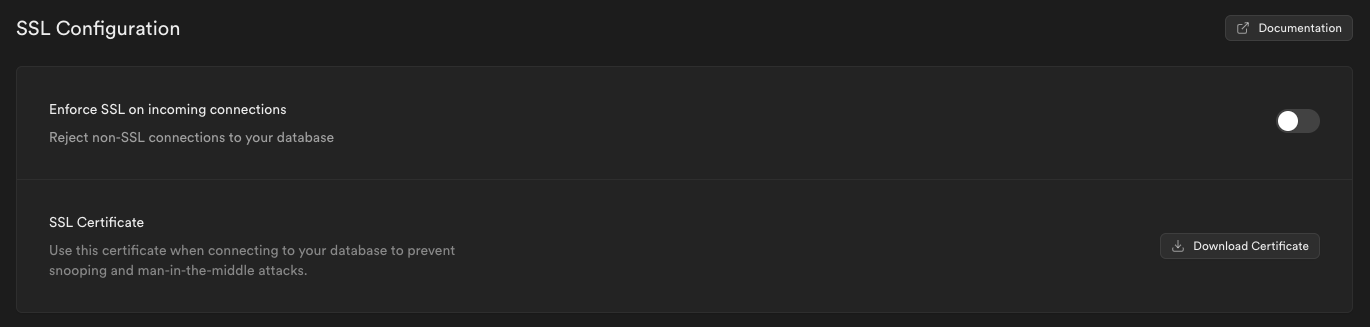
require encrypts the connection but doesn't verify the server, so it doesn't stop a man-in-the-middle attack. To verify as well as encrypt, download your server root certificate from Database settings in the Supabase Dashboard and point your driver at it. Downloading the certificate on its own changes nothing: the driver has to be told to use it, with sslmode=verify-full and sslrootcert on a connection string, or the equivalent option in your library. The same section has a toggle that rejects non-SSL connections to your database.
Stale connections#
Serverless runtimes freeze a function between requests, which can leave a pooled TCP socket stale. If you see CONNECT_TIMEOUT errors or queries that hang until the execution limit, see Troubleshooting CONNECT_TIMEOUT or hanging queries in Serverless Functions.
Quickstarts #
Each quickstart connects one ORM or database GUI to your Supabase database.
Related#
- Connection pooling and limits explains poolers, pool size, and connection limits.
- Serverless drivers covers Vercel, Cloudflare Workers, and Supabase Edge Functions.
- Managing connections covers monitoring and diagnosing stuck queries.
- Connecting with psql
- Importing data into Supabase
Troubleshooting#
- Tenant or user not found, when the pooler can't match your host and username to a project.
- FATAL: Password authentication failed
- Connection refused, which is usually an IP ban rather than an outage.
- Too many connections